Pages

Sunday, May 26, 2013

What!!!!

Xbox 720 now officially known as the Xbox one :

 
For years we've heard about the ever-widening appeal of video games and game-playing devices. Women gamers, senior gamers, casual gamers, and even the kind of social/mobile gamers who would never refer to themselves with the dreaded G word.
But, when it was time to reveal its first major gaming hardware of the post-iPhone era (the first-gen iPhone was released in 2007, the Xbox 360 in 2005), what did Microsoft do? It narrowcast the launch presentation of the Xbox One to a very targeted demographic group. And no, it wasn't the cliched teenage or twentysomething twitch gamer, it was the graying dad demographic that the original Atari 2600/Nintendo Entertainment System generation grew up to be (and some would say they grew up to be grups).
The evidence is clear. The first images of the Xbox One presentation were not of young, overly excited gamer-types straight out of a television commercial casting call, but of graying establishment figures, from Bill Gates to game designer Cliff Bleszinski to J.J. Abrams and Steven Spielberg (an observation first made by a former EA employee and games writer here).
 
Next came the physical product itself. The actual Xbox One hardware has been described many ways, but I think it's most accurate to call it retro-modernist. The boxy black rectangle with its chrome accents and glossy finish looks more like an '80s/'90s stereo rack component than a modern game console. It might be the type of thing you'd see in the background ofPatrick Bateman's apartment. 
While nearly everyone uses some combination of iPhone, Jambox, and Spotify for music these days, there's an entire generation (or two) of Gen X-ers who still dream of big, shiny, rack-style stereo components, the sort of thing one of my college roommates blew much of his student loan on.
After the introduction of the Xbox One console came the features. Not new games or social media tie-ins, but instead the most basic of all home entertainment functions -- watching television. Is there any group besides the 35-to-45-year-old dad demographic that would really look forward to making their passive on-the-couch viewing experience require even less effort than rooting around for a remote control and pushing a few buttons?
That the onstage example then morphed into sports, ESPN, and overlaying fantasy football content merely sealed the deal, as did a quick hit of online sports video chatting (using Skype, just like at the office!)
From there, we heard about made-for-Xbox video content, with an onscreen cameo from Steven Spielberg and talk about a Halo live-action series (based on a game franchise that started 12 years ago).
By the time we got to actual games, we saw a Forza driving game -- clearly aimed at the same demographic that flips past BBC America hoping to catch a "Top Gear" rerun; and the latest Call of Duty game, certainly a series with cross-generational appeal, but also one that has been pumping out sequels since 2003. In fact, after the Xbox One launch event, these was much grumbling from the gamerati about how they had been essentially ignored by Microsoft (although Microsoft's upcoming E3 video game trade show presentation will no doubt lean more heavily on the games).
But, as brilliant as this dad-first strategy may appear to be, it's still disappointing to see the Xbox One ignore the broadening base of interactive-entertainment consumers. There was essentially nothing for female gamers, nor for social-media gamers, nor the growing demographic of consumers who are slowly eating away at EA, Activision, and the like by spending their time on free-to-play games such as Candy Crush Saga or Fast & Furious 6 on their phones and tablets-- leaving the living-room TV -- and any big, black, glossy boxes attached to it -- free for dad to enjoy.

Wednesday, May 1, 2013

HTC First Facebook Phone :


Facebook Home on HTC First can be disabled for stock Android : 

HTC and Facebook officially announced the "Facebook Phone," AKA. the HTC First this week and reports show that the device is running stock Android.
According to Phandroid, the HTC First "will not only be the world's first Android device tailored to run Facebook Home, but it's also the first HTC device to run stock Android since the T-Mobile G2.
HTC have confirmed that users have the ability to disable Facebook Home or clear its defaults and run on the stock Android interface.
Stock android means an un-skinned version of Android that comes with stock Android apps like messaging, camera, gallery, stock notification bar etc.
Important to note that the ability to get direct updates from Google is not available, users would need a device such a Nexus handset for that privilege.
Android have created a phone running a UI 'skin,' which in this case is Facebook Home which can be easily disabled and switched to plain 'stock' Android settings.
HTC First will be available on AT&T on 12 April, followed by EE launching it in the UK over summer.
The handset will be available in four colours: red, baby blue, white and black and will feature a 4.3-inch 720p dispaly, 5-megapixel rear camera, 1.6-megapixel front camera, 1GHz dual-core processor, LTE, Android 4.1.2 Jelly Bean, and the pre-loaded Facebook Home.
The Facebook Home application will be also be available for download from other smartphone devices on April 12th.

BlackBerry Z10 smartphone review


BlackBerry Z10 smartphone review :

To be honest, I can’t remember the last BlackBerry device that I reviewed. It’s been many years ago and they’ve been off my radar until recently. The announcement of the BlackBerry Z10 smartphone caught my eye because of the phone’s good looks. But can this smartphone run with the iOS and Android big dogs, or are the best days of popularity and market share behind them? Verizon Wireless sent me a BlackBerry Z10 loaner device and I’ve been using it exclusively for the past week. Does my Samsung Galaxy S3 have anything to fear? Let’s see.
Note: Images can be clicked to view a larger size.

Hardware specs

Operating system: BlackBerry 10 OS
Processor: Dual Core 1.5 GHz
Memory: 2GB RAM, 16GB Flash
Expandable memory: Removable microSD memory card (Up to 32 GB)
Display: 4.2″ 1280 x 768 resolution 356 PPI, 24-bit color depth, 15:9 aspect ratio
Camera: Rear camera 8 megapixel auto-focus camera, Front camera 2 megapixel
Wi-Fi: 802.11 a/b/g/n
Bluetooth: 4.0 Low Energy (LE)
GPS, NFC
HDMI Port: Micro HDMI for connection to your HDTV or projector
Battery: 1800mAH removable battery, Up to 10 hours talk time (3G), Up to 13 days standby time
Size: Height 130 mm / 5.12 in, Width 65.6 mm / 2.58 in, Depth 9 mm / 0.35 in
Weight: 135.4g / 4.78 oz
blackberry-z10-50

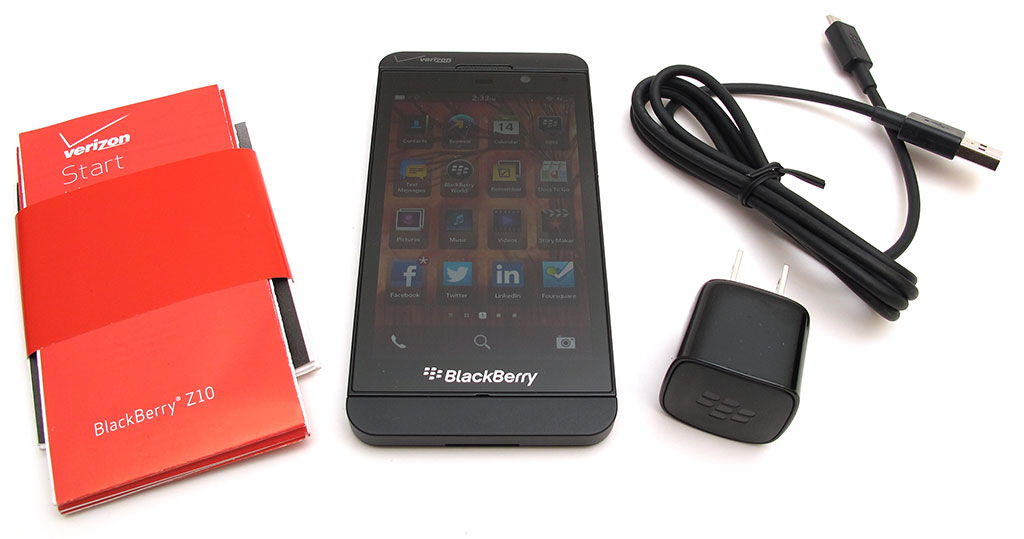
What’s in the box

BlackBerry Z10 smartphone
USB cable
AC adapter
Quick Reference Guide
blackberry-z10-2

Physical design

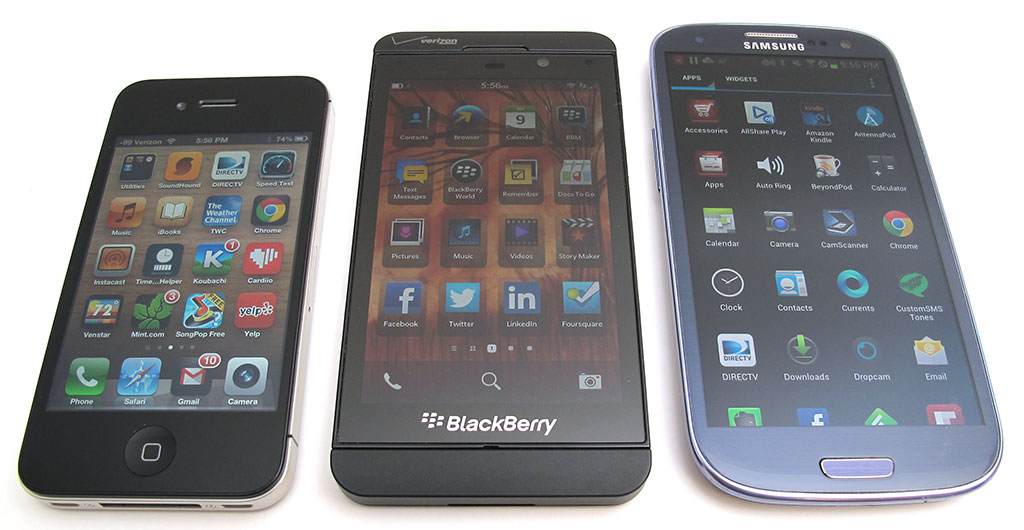
The Z10 is available in black or white. I was sent the black version which you see above with an iPhone 4S and a Samsung Galaxy S III for a size comparison.
blackberry-z10-3
This phone looks very iPhone-like to me due to the squared sides, rounded corners and solid feel in hand.
blackberry-z10-4
It’s not too thick and not too thin. Although it’s a similar length and thickness to my SGS3, it feels smaller in my hand.
blackberry-z10-5 blackberry-z10-6
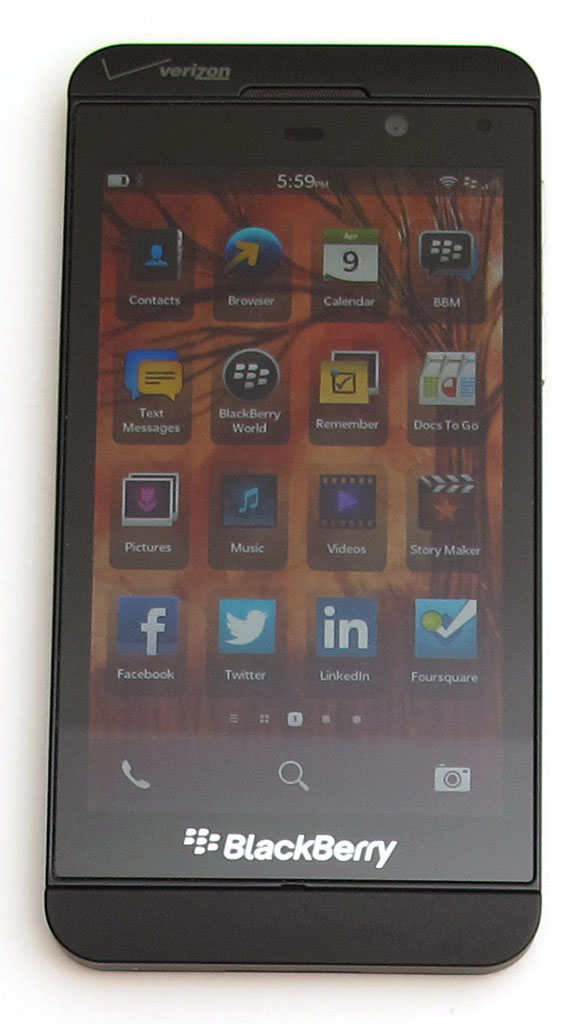
The face of the phone is mostly the display. But there is a band of soft touch Black plastic or metal (not sure which it is) on the top and bottom edges. There are no buttons on the face of the phone, but there is a microphone under the mirrored BlackBerry logo at the bottom edge of the display. The top edge has a speaker, status LED and a front facing camera.
blackberry-z10-51
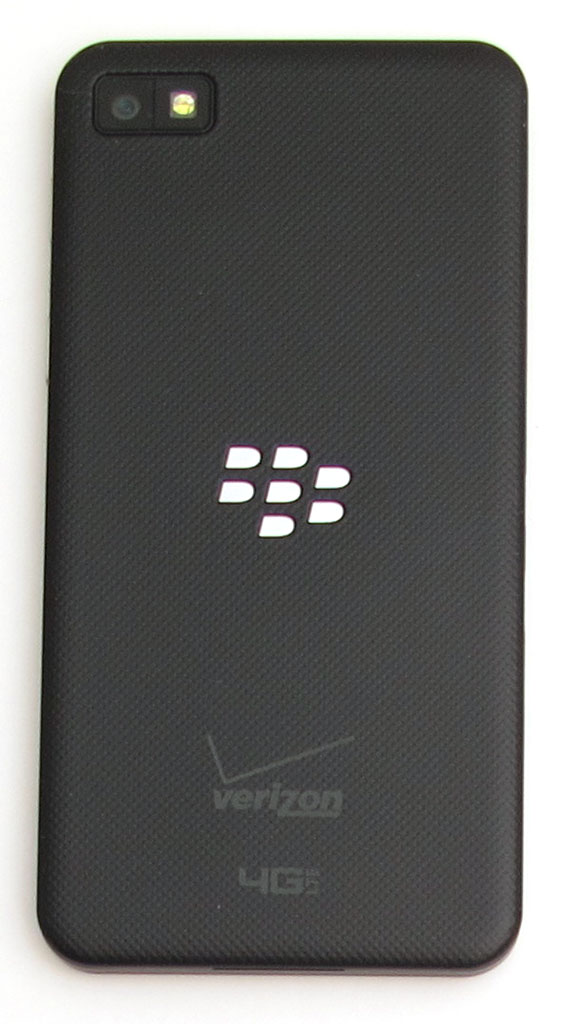
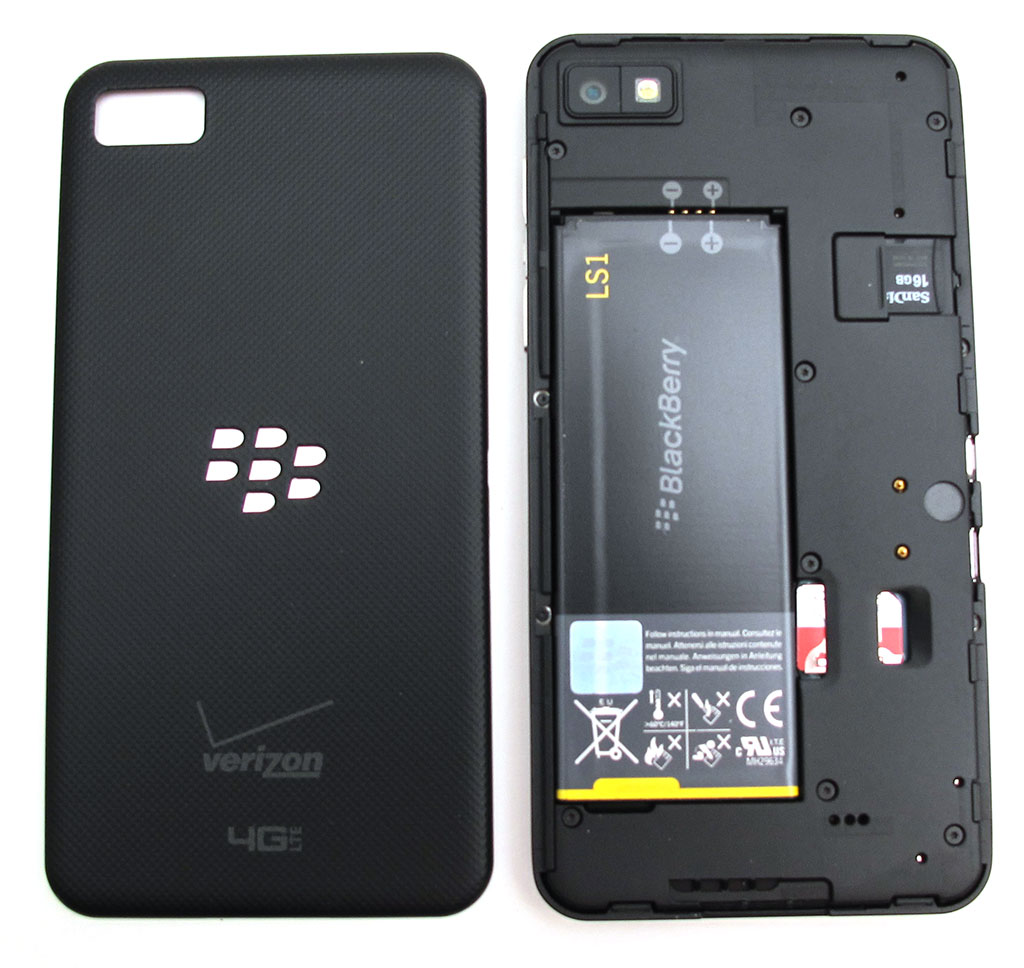
The back of the phone has a soft grippy micro-dimpled cover that is easy to remove for quick access to the battery, microSD card and SIM card slots.
blackberry-z10-7
On the left side you’ll find a micro USB port that is used to charge and sync the phone with a computer. There’s also a mini HDMI port, but you’ll have to buy a cable if you want to hook the phone up to your TV.
blackberry-z10-8
Separate metal volume buttons with a play/pause/voice control button in the center are located on the right side of the phone. The voice control button can be held down to wake the phone and go straight into the voice control app.
blackberry-z10-9
The top edge has a metal power/wake button, 2nd microphone and a 3.5mm headphone jack.
The BlackBerry Z10 feels great in hand. It’s solid and has a bit of heft to it that gives it a quality feel. It passes my ever popular Gadgeteer squeeze test with absolutely no flexing, creaking, cracking or whimpering. I love the feel of this device. Especially the grippy back cover which I wish I had for my SGS3.

Display

blackberry-z10-56
The display, while small (compared to my SGS3), is very crisp, clear and has vibrant color. It is viewable at almost any angle and is easier to  view outdoors in direct sunlight than most phones I’ve tried.
Since the Z10 uses gestures and swipes for navigation instead of buttons, a sensitive touchscreen is a must. Most of the time I had no problems, but fairly often I did notice some of my touches would go unnoticed.

Making and receiving calls

No complaints here. I did not have any dropped calls or other call issues during my week long use of this phone. Granted I don’t make a lot of calls every day, but no one commented negatively with the way I sounded and I noticed nothing unusual on my end of conversations. Volume levels were adequate for calls with the phone held up to my ear and signal strength seemed on par with other Verizon phones that I’ve used.
Using the Z10 as a speaker phone fared a little worse. Trying to hold a speaker phone conversation in a slightly noisy area was tough as volume didn’t seem to be high enough. Quiet rooms were fine though.

Camera

The Z10 has a pretty good camera that can snap images by tapping the display or by using either volume button as a shutter.
blackberry-z10-53 blackberry-z10-54 blackberry-z10-55
The camera interface is easy enough to use, but it took me awhile to figure out that you have to drag the focusing box to the area that you want in focus and then tap the screen a 2nd time to capture the shot. This seemed odd when compared to other phones that will allow you to just tap the area you want in focus and then snap a photo automatically.
There’s built in software that you can use to edit your images by adding filters, cropping, adjusting brightness, sharpness, etc.

System performance and battery life

The Z10 feels snappy loading apps, scrolling through lists, loading web pages, etc. The only noticeable lag problem I really noticed was in booting the phone. Wow, that’s slow. Resetting to default settings is also painfully slow. I know this isn’t an every day task, but I almost thought the phone was bricked because it took about 15 minutes to recover from a hard reset.
Battery life has been pretty good. Better than my SGS3. I was able to get a full day to day and a half with one charge. That was with a couple calls, more than a dozen texts, email checks, a couple games, and other light work.

User interface and software

As I mentioned above, the BlackBerry Z10 doesn’t have a home button or on screen nav buttons. Everything is touch based. That even includes a way to wake up the phone…
blackberry-z10-10 blackberry-z10-13
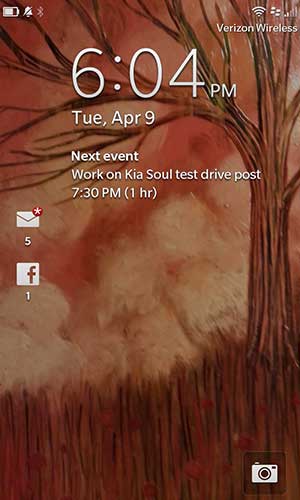
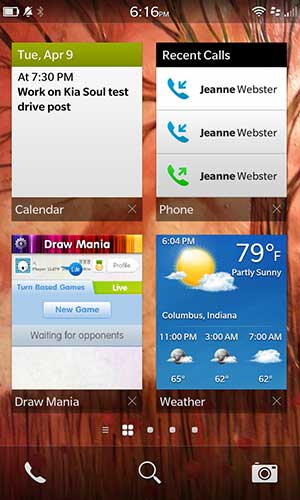
You can wake up the Z10 by swiping your finger up from the bottom edge of the display. If you swipe halfway up and let go, you’ll see the lock screen which shows the current time, date, next event on your calendar and other notifications for new emails, text messages and other social media.
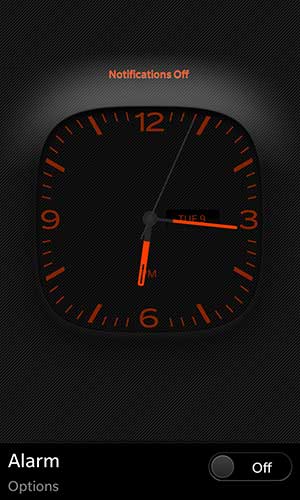
If you then swipe down from the top edge of the display from the lock screen, you will switch into night mode. Night mode offers a special red on black clock display and alarm options.
blackberry-z10-11 blackberry-z10-20
Swiping all the way from the bottom to the top of the display bypasses the lock screen and takes you to where ever you left off before the phone went idle.
Scrolling left to right allows you to switch from a thumbnail view of currently running apps to an icon view of installed apps. The thumbnail view scrolls vertically to show 8 apps, some even update in real time like the weather app. Whenever you’re in an app and swipe up from the bottom of the display, that app will minimize and will be added to this thumbnail view.
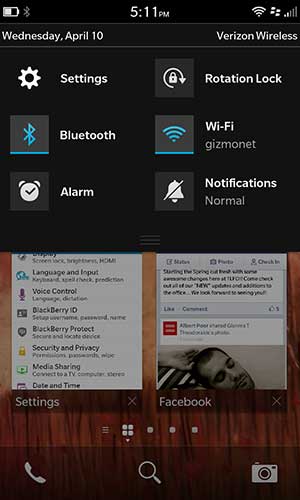
You can bring up the settings for a running app by swiping down from the top of the display.
blackberry-z10-12 blackberry-z10-21
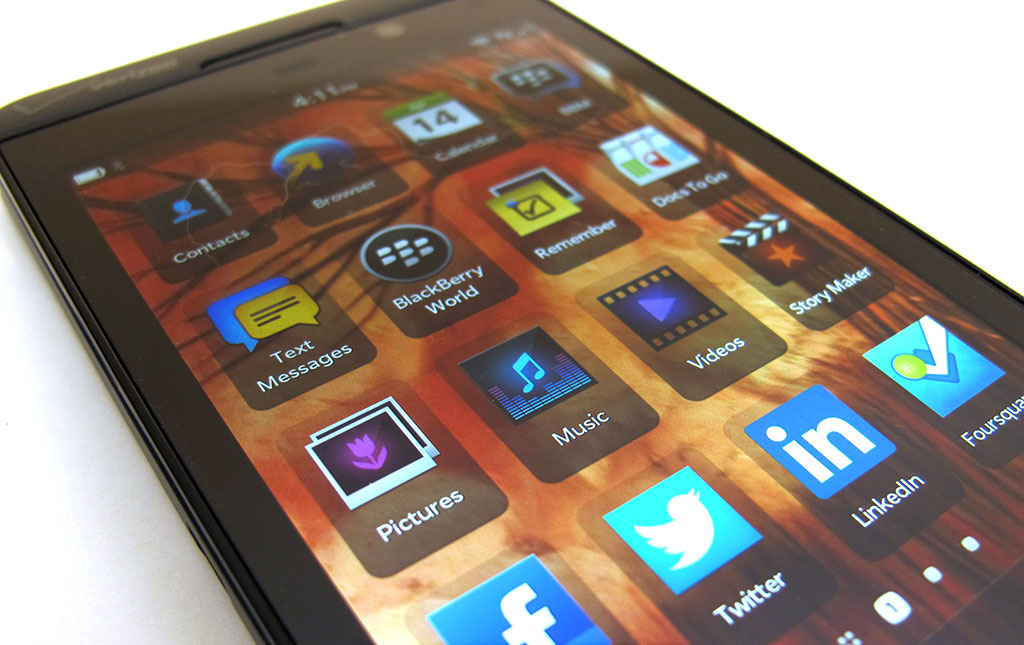
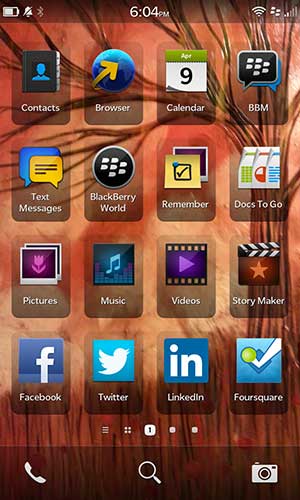
The icon view / list of installed apps looks ugly in my opinion. For one thing, it looks too much like iOS, only way less attractive. I don’t know who had the idea to put the dark shadow boxes behind the icons, but bleh…
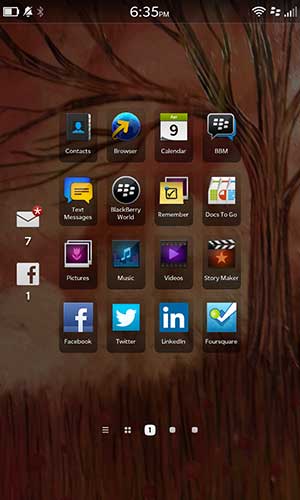
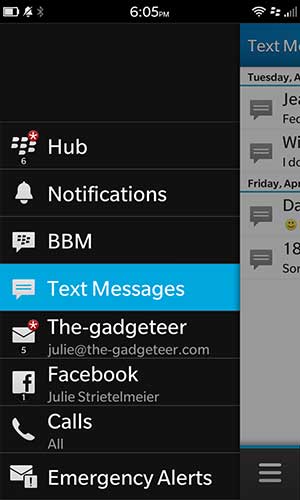
BTW, there’s a cool thing about the swipe from bottom to top gesture to go back to the thumbnail view… if you swipe just halfway, you’ll see your email, facebook, texts, etc, notifications on the left side of the display. This gives you a quick way to check if you have new messages.
blackberry-z10-14 blackberry-z10-57
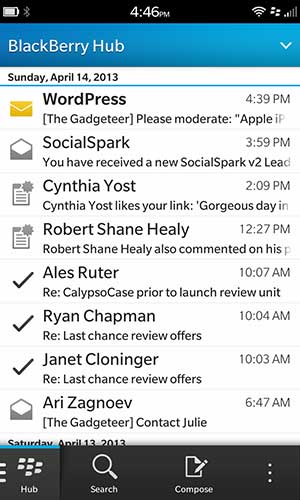
Speaking of notifications, BlackBerry offers what they call the Hub, which consolidates all your incoming communications into one place. It’s a handy feature and can be accessed at anytime by swiping up from the bottom display and to the right… kind of like an upside down L. You’ll probably either like this feature or hate it as it gives you a running list of emails, texts, facebook posts, etc all in one screen.
One thing that I was really surprised and disappointed with the Z10 was how the notifications for unread emails, facebook posts, etc almost never reflected the true counts. That’s because they were never syncing in real time. The shortest sync time that can be used is 15 mins. I’m not sure if this has anything to do with the fact that I use Gmail or if it’s just the way it is, but it makes using the Hub less than useful. Back in the day I recall BlackBerry was faster at receiving / showing new messages than even my desktop PC. Not sure what’s changed.
blackberry-z10-16 blackberry-z10-17
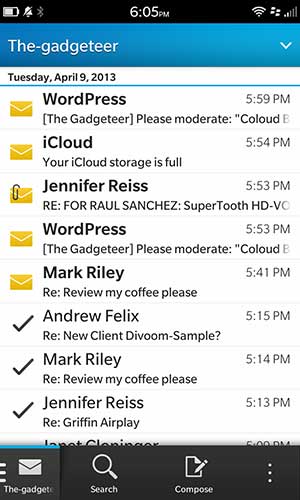
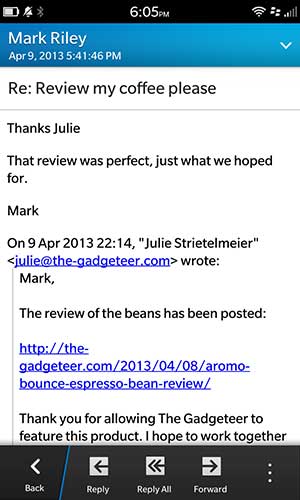
My Gmail for domains account worked fine with the Z10. I would have preferred a dedicated Gmail app though. As is, it doesn’t allow for labels, or stars which is a deal breaker for me.
blackberry-z10-15 blackberry-z10-19
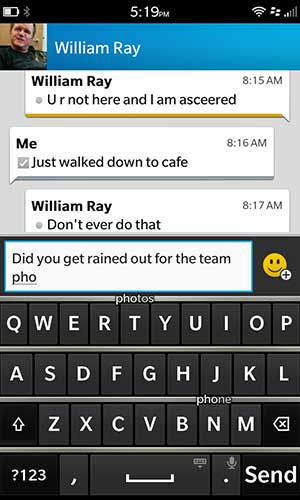
Text messaging with the Z10 is relatively standard except for the interesting predictive keyboard feature. See the little words in the image above on the right? That’s the Z10 trying to predict the word I am typing. If it guesses the word correctly, you can choose it by flicking it up with your finger. This was kind of cute at first, but it quickly became distracting to me because I was wasting time watching for the words to appear and then lifting my finger to flick it. I think this feature made my typing slower instead of faster. I’ll stick with Swype or Swiftkey on my SGS3 :)
blackberry-z10-18
The built in browser on the Z10 is ok. It gets the job done, but it’s not nearly as nice as Chrome, which I use on every device I have because it syncs bookmarks and open tabs across devices.
The Z10 comes with a decent selection of pre-loaded apps:
BlackBerry Hub, Contacts, BlackBerry Browser, BlackBerry Calendar, BBM, Text Messages, BlackBerry World, BlackBerry Remember, Docs To Go, Pictures, Music, Videos, Story Maker, Facebook, Twitter, LinkedIn, Foursquare, BlackBerry Maps, Games, YouTube, Voice Control, Weather, Clock, Calculator, Compass, File Manager, Box, BlackBerry Connect for Dropbox, Print To Go, Smart Tags, Settings, Adobe Reader, Phone, Camera/Video Camera/Time Shift, Setup, Help, SIM Toolkit, Search
A trip to BlackBerry’s app store, called BlackBerry World, was met with disappointment when I couldn’t find a large number of my must-have apps like: Evernote, Netflix, Skype, Words with Friends, DirecTV, Gmail, Chrome, Feedly, Instagram, Pandora, Hulu, Spotify.

Summing it all up

After a week (almost 2) using the BlackBerry Z10 smartphone exclusively, I can say that it’s a decent handset which has good performance, an easy to use interface, nice camera and an adequate collection of pre-loaded apps. I had no really complaints while using this phone other than a lot of my favorite apps aren’t yet available for it. The thing is, that while the phone works just fine, there’s nothing about it that makes me want to keep using it and buy one of my own. Other than the gestures, the phone feels a little behind the curve for me. I think BlackBerry has a hard climb ahead of them and I’m not sure they will see the top anytime soon, if at all.


Best Android phones to buy in 2013: Smartphone buying guide


Top 5 Android phones to buy in 2013:  

1. HTC One

So the Android phone to currently beat is the HTC One, not to be confused with the One X+ and One X. Powering HTC's latest sleek One Series offering is a Quadcore Qualcomm Snapdragon processor clocking in at 1.7GHz with 2GB of RAM. A 4.7-inch, 468ppi display takes centre stage making a mockery of the pixel density sported by the iPhone 5 and with its Ultrapixel camera the One can shoot stellar snaps letting in 300% more light compared to its 13-Megapixel pic-grabbing rivals.   

2. Samsung Galaxy S4 

The S4 is certainly a smartphone of great beauty and is packed with features that make it an improvement on the S3, but it's not quite enough to knock the HTC One of the top spot. Jumping from a 4.8-inch display to an almost Note-like 5-inch Full HD Super AMOLED display, the S4 promises 441 ppi which is a massive jump in terms of clarity. The impressive 13-megapixel camera puts it up with the Xperia Z in terms of snapping and while it's not packing an Octocore processor, quadcore power is more than enough to power the S4, just not enough to topple the HTC One.

3. Sony Xperia Z 

Sony's best smartphone yet, the Xperia Z has smashing 5-inch full-HD display with 443 ppi (compared to the iPhone 5's 324ppi) , superior 13-Megapixel camera ,chic styling and and all round excellent performance that makes the waterproof smartphone with NFC and 4G LTE one the best Android handsets to buy. 

4. HTC One X+ (T3 rating: 5/5)

The HTC One X's smarter brother is now the golden child of the HTC family boasting a fast, quadcore processor for smooth  operation and gaming plus a massive 64GB of storage. With an excellent 8-megapixel rear-facing camera capable of 1080p full HD video and the latest HTC Image tricks the One X+ might need charging every day but it is still one of the current Android smartphone greats. 


 5Google Nexus 4  
Swapping Samsung for LG, the latest Nexus sports a 4.7-inch IPS display with a screen resolution of 1280x768 putting it up with the S3 in terms of clarity and vibrancy. Running Android 4.2 Jelly Bean, the Nexus 4 gets to reap the benefits of more cards for Google Now and the ability to take 360 degree photos amongst other new features. There's a Qualcomm Snapdragon S4 Pro processor to take care of performance and it even packs wireless charging.

Sunday, January 13, 2013

Xbox 720 Countdown :


The countdown will end on June 11, 2013, with E3 running from this date until June 13.


Saturday, January 12, 2013

Microsoft's IllumiRoom Concept Makes Your Living Room Look Amazing


Microsoft's IllumiRoom Concept Makes Your Living Room Look Amazing :

Microsoft is no rookie when it comes to experimenting with new gaming technology, as they've spent over two years trying to convince us that Kinect is a thing worth owning. Based on a new tech demo video showcased at Samsung's CES keynote, they're working on a new display-based accessory that incorporates the gamer's living room.
I'm no expert on display technology, but it appears that the IllumiRoom accessory makes it so a whole bunch of crazy crap gets shined all over your walls. The video below showcases flames erupting out of the side of the television, city streets and other backgrounds scrolling by on the room's back wall, and assorted particles flying all over the entertainment center's drawers and shelves. 
According to the official Microsoft Research YouTube page, this video is a real time demonstration. A thread on NeoGAF is currently speculating that the tech may be related to this patent. 
No details regarding a potential retail release were discussed, but the Microsoft Research site says that more info is coming in late April at the CHI 2013 conference in Paris.

Steam 'game console' hardware debuted at CES


Steam 'game console' hardware debuted at CES


A modular PC designed to let users to play Steam games on their TV has been unveiled at CES.
Exploded view of Xi3 PC
Some Xi3 small form factor PCs are based around dual core Intel chips
Codenamed "Piston", the prototype, developed by Xi3 Corporation and funded by Valve, was unveiled at the CES trade show in Las Vegas.
The set-top box will allow users to access thousands of gaming titles through an integrated system, a statement said.
Plans for the living room-friendly console emerged early last month.
"Today marks the beginning of a new era for Xi3," said Jason Sullivan, founder and chief executive of Xi3, in a statement.
"This new development stage product will allow users to take full-advantage of their large high-definition TV displays for an amazing computer game experience," he added.
"As a result, this new system could provide access to thousands of gaming titles through an integrated system that exceeds the capabilities of leading game consoles, but can fit in the palm of your hand."
Despite the grapefruit-sized device being on show on both Valve and Xi3's stands at CES no details of its internals have been given. Other Xi3 computers are based around dual core Intel chips and use solid state storage.
Valve, best known for the Half-Life, Left4Dead and the Steam online game store has long been known to be working on a console or set-top box that puts PC-based titles onto a TV. It is not yet clear if Piston is the hardware gaming gadget that will bring that project to fruition.

Razer’s Project Fiona is now the Razer Edge gaming tablet


Razer’s Project Fiona is now the Razer Edge gaming tablet :
Razer were busy teasing this device as Project Fiona a year ago. It re-emerged from the obscurity of Razer’s R&D shroud this week at CES this week with a new name and some new moves. The ungainly handlebar controllers that we saw a year ago are detachable, the base unit can slot into a keyboard to turn it into a more conventional desktop unit, or you can carry it around and use it as you would any touchscreen tablet.
It’s also quite powerful. An Intel Core i7 chip, 8GB of DDR3 RAM, a solid state HDD and an NVIDIA GT 640M LE GPU should push decent framerates to the 10.1″ 1366×768 screen. The downside? You’ll need $1,299.99 to buy one. Razer are giving potential customers a chance to register interest on the Razer Edge site now alongside a video showing off the Edge in its various guises. Watch that and grab the full specs below.
Here are the tech details for the Pro version of the Edge.
Processor: Intel Core i7 Dual core w/ Hyper Threading Base 1.9GHz / Turbo 3.0GHz
Memory: 8GB DDR3 (2x4GB 1600MHz)
Video: Intel HD4000 (DX11), NVIDIA GT 640M LE (2GB DDR3, Optimus Technology)
Display: 10.1” (IPS, 1366×768) 10-point capacitive touch
Operating System: Windows 8
Storage: 128/256GB SSD (SATA-III)#
Network: Intel WLAN (802.11b/g/n + BT4)
Others: Stereo speakers
Codec supports 7.1 (via HDMI)
HD Webcam (front-facing, 2MP)
Array microphones
Dolby Home Theater v4
USB 3.0 x1 (green, SuperSpeed)
Audio jack (3.5mm, 4-pole, stereo out / mic in)
Well, I definitely like it better than Lenovo’s giant table tablet PC.

The vibrating fork that stops you eating too much


The vibrating fork that stops you eating too much

  • Gadget set to go on sale in April, and comes complete with an 'eating coach' app

  • Fork vibrates and lights flash if user tries too eat too quickly


Smart cutlery that can monitor exactly how much you eat is set to go on sale within months.
The HAPIfork uses electronic sensors to monitor how much , and how fast a user is eating.
If they eat too quickly, the fork vibrates, and bright lights flash on its handle.

The Hapilabs fork, which wirelessly transmits details of how quickly you eat to an app. Eat too quickly, and it vibrates and flashes.
The fork also wirelessly connects to a user's phone to send their eating habits to a special app.
The HAPIfork's makers claim that people only naturally feel full after about 20 minutes of eating, and so by diminishing the amount eaten in that period users will eat less and consequently lose weight.


The project, which is set to be funded via Kickstarter, will sell for $99, also claims to reduce digestive problems and acid reflux
'Most people eat faster than they should and do not realise that eating too fast ins’t a healthy behaviour, negatively affecting things like digestion and weight control,' said HAPIlabs’ US President Andrew Carton.
The fork will track the duration of a meal, the number of fork servings and the duration of each interval between servings.
The smart fork can monitor any food, and warn user's if they are eating too quickly.
'Eating too fast, and not chewing long enough leads to poor digestion and poor weight control,' the firm says.
'Every time you bring food from your plate to your mouth with your fork, this action is called a 'fork serving'.
The HAPIfork also measures how long it took to eat your meal, the amount of 'fork servings' taken per minute and intervals between 'fork servings'.
The HAPIfork also comes with the HAPILABS app plus a coaching program to help you eat better and change your eating behavior, and is expected to go on sale in April.
The fork is set to go on sale in April for £60 ($99)


Samsung shows off paper-thin, bendable mobile screen


Samsung shows off paper-thin, bendable mobile screen :

Bend it like Samsung ... the tech giant has hinted at a day when we might fold up our smartphones.
The Korean electronics company has provided a glimpse of such a device at a keynote speech at the Consumer Electronics Show in Las Vegas.
What it is

Brian Berkeley, head of Samsung's display lab in San Jose, California, demonstrated a phone that consists of a matchbox-sized hard enclosure, with a paper-thin, flexible colour screen attached to one end. The screen doesn't appear flexible enough to fold in half like a piece of paper, but it could bend into a tube.The company also showed a video of a future concept, with a phone-sized device that opens up like a book, revealing a tablet-sized screen inside.

How it works
The screen uses organic light-emitting diodes, or OLEDs. Only a thin layer of these chemicals is needed to produce a bright, colourful screen. They're used in many Samsung phones already, though with glass screens. For the bendable phone, Samsung laid the chemicals over thin plastic instead of glass. That's a trick you can't pull off with liquid crystals in standard displays.
Why you'd want it
You could pack a bigger screen in your pocket. In a more conventional application, Berkeley demonstrated a phone with a display that's rigid, but bent around the edges of the device, so it can show incoming messages even with a cover over the main screen. In short, OLEDs free designers to make gadgets with curved screens.
Why it might not work
It's tough to use a touch screen if it bends away from your finger. Flexible OLED screens have been demonstrated for years, but the OLED chemicals are extremely sensitive to oxygen, so they need to be completely sealed off from the air. Volume production of flexible displays that remain airtight has so far stumped engineers. Samsung's screens aren't yet flexible enough to fold, just bend.
Availability
Samsung didn't say anything about when flexible displays might be commercialised.
"The concept of the flexible screen has been around for some time, but it finally looks as if Samsung is really going to deliver on that technology," said Steve Bell, a technology consultant and president of KeySo Global.


Wednesday, January 9, 2013

Nvidia Shield: Gaming tablet review


Nvidia Shield: Gaming tablet impresses(Hands-On) 

Whether the device will actually be called Shield when it debuts has yet to be decided, but that's the name Nvidia's going with for now. Shield is shaped and feels like a gaming controller. In fact it could be described as an Xbox 360 controller with a 5-inch screen at the top. Weight-wise it felt a bit heavier than a stock controller, by maybe a pound or so. Overall, it felt nearly as comfortable as my beloved Xbox 360 controller, but I did notice that the screen on one of the models felt kind of loose and wobbled a lot when I moved the device.

 Streaming has its limits

The coolest feature of Shield is most definitely its ability to stream games from your PC to the device. A really cool concept that feels part Wii U, part OnLive, but as exciting as the prospect is, there are limitations.
For one, it only streams over Wi-Fi; unless your buddy also has a powerful PC and doesn't mind you playing games at his house while you two hang out, this will be something you only do in the comfort of your own home. Also, there is latency. If you're a frame counter or someone who plays games professionally, that's going to be a problem. Admittedly, that's a very small percentage of the public, however.
 Also, the quality of your experience will depend on the quality of the Wi-Fi network you're connected to. During my demo, the Wi-Fi network lost connection to Shield and the connection had to be re-established, which took a few minutes. An Nvidia rep, however, did comment that this is one of the reasons the device is not yet on shelves.
The final stipulation/caveat I'll mention is the fact that in order to stream games, the PC you're connected to must house a GeForce GTX 650 or later to function. AMD/ATI owners need not apply.
First thoughts
Despite the caveats I've mentioned, I'm champing at the bit to see the final product. Nvidia plans to release Shield in the second quarter of this year, but the real question is price. While Nvidia wouldn't tell me outright what to expect, it hinted at what not to expect: a heavily subsidized device.
No, expect the price to reflect the advanced hardware housed within, and while streaming from a PC is a cool novelty, as a gaming device, this thing will live or die based on the quality and proliferation of the games natively available for it. Hopefully the several months of lead time before release will be enough for Android developers to get Android gaming into a much more impressive state. 

The New Lego Mindstorms EV3 hands-on


The New Lego Mindstorms EV3 hands-on:  

Gallery Photo: Lego Mindstorms EV3 pictures 
Lego Mindstorms build-your-own-robot kits have been with us since 1998, back when programming them required a computer with a serial port. The new Linux-based Lego Mindstorms EV3, however, doesn't even need a computer: you can set up basic routines right on the programmable Lego brick itself, and / or remote control a robot from an Android or iOS smartphone. For many buyers willing to spend $349.99, though, the best part will probably be this: the EV3 is an absolute blast to play with, right out of the box. We just got to try the EV3 at CES 2013 today, and each and every one of the included designs is a wonderful, thought-provoking toy even on its own. 

There's a robot snake that slithers along on wheels, and actually snaps out to bite your hand when the infrared sensor sees you there. You can shake a smartphone to make it hiss and strike, or tilt to use the phone's inertial sensors to steer. There's a robotic rover that can track lines on a floor, with a set of four working snap-on interchangeable tools: a gripper claw, a ball launcher, a hammer, and a spinning bladed chopper for some purely plastic BattleBots action. There's a treaded design with strong gear-driven arms just large enough to bring you a beer soda can. And then there's the scorpion with a seek-and-destroy mode, where it hunts down your infrared remote control brick, then flips up its missile launcher of a tail to blast it with little plastic balls. It didn't work quite right in our video, sadly, but the scorpion shot us earlier.
BLAST, GRAB, FOLLOW, CHOP, HAMMER, WALK, STRIKE, SLITHER, ROLL
If you've got an iPad, they're even easier to build, because Lego's got an app with animated step-by-step instructions courtesy of Autodesk. (A company rep tells us that Mindstorms is the first, but future Lego set instructions might also be available there.) The infrared remote control and sensor, color sensor, touch sensor and three motors give the kit room to expand on these designs, too. What if you put a color sensor next to the infrared one on the robot snake, programmed it to ignore that color, and then wore that color of shirt? You could have a snake that snaps at other people... but not its master. We can't wait to see what Mindstorms EV3 will do when builders like Akiyuki —and NASA — get their hands on it.


Friday, January 4, 2013

Do Not Disturb !!


Do Not Disturb iPhone and iPad bug found in iOS 6 :


Those iPhone 5 owners who decided to sleep through the coming of the New Year may have found a library of messages they never heard thanks to a new iOS 6 bug


UPDATE:
Apple has announced that the bug affecting the Do Not Disturb app for iPhone 5 and iPad will sort itself out by January 7th. In a statement on its official support blog, Apple said:
"Do Not Disturb scheduling feature will resume normal functionality after January 7, 2013. Before this date, you should manually turn the Do Not Disturb feature on or off."
ORIGINAL STORY:
A bug has been found which stops the Do Not Disturb feature for iPhone 5 and iPad turning off after the 1 January. The feature which comes withiOS 6 allows users to silence everything except their most important contacts.
Engadget reports that the bug is connected to 1 January with users finding that when they woke up the Do Not Disturb feature was still enabled with the only fix being to change the date on the phone or restart the handset.
Apple hasn't yet come forward to comment which suggests that there may not be a fix available at Apple stores yet either. This isn't the first time that the technology company has come unstuck thanks to the date.
In 2011 an iOS clock bug meant that many users found their alarms failing to go off on New Year's Day with the clocks then failing to update to DST automatically.